Surfer SEO Alternatives for Refreshing Old Content
Written and reviewed by NisonCo SEO Team·Written in Collaboration with AI·Updated November 16, 2026·9 min read
Looking at Surfer SEO alternatives for updating old posts? See what Surfer, Clearscope, Frase, MarketMuse and Perennial each do for content refreshes.
Practitioner guidance reviewed for accuracy, usefulness, and alignment with current search documentation.
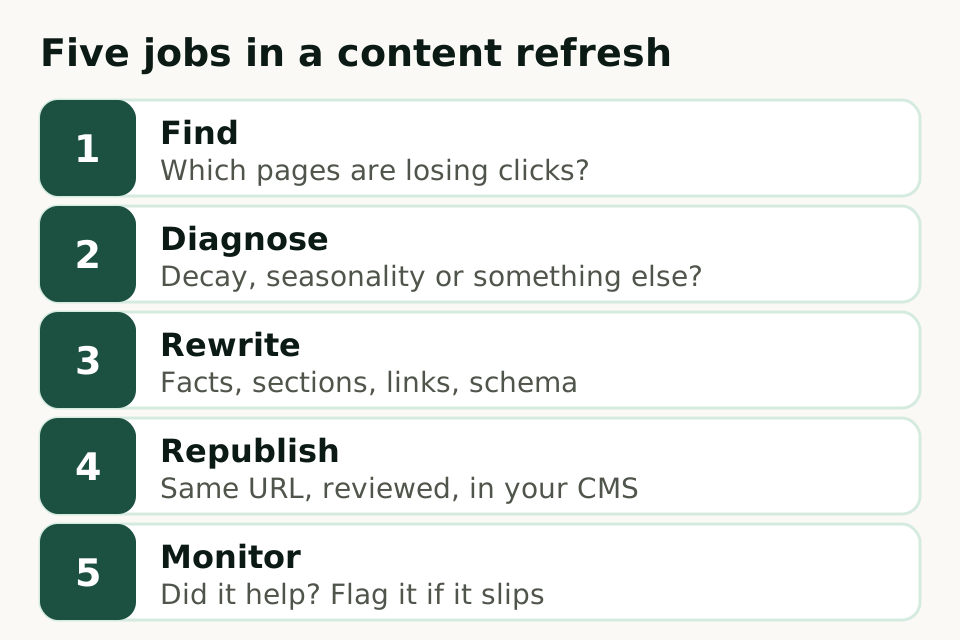
If your real job is keeping old posts ranking, judge each Surfer SEO alternative on five tasks: finding pages that are slipping, diagnosing why, rewriting them, republishing on the same URL, and monitoring what happens next. Below, we summarize documented features relevant to those tasks.
What to remember
Try your current tool’s documented refresh workflow before deciding to switch.
Check each step from diagnosis through review, CMS publishing and follow-up in a trial.
Test any tool on five of your own decaying pages before you commit.
No tool can guarantee that a refreshed page will recover its rankings.
Start with the refresh job, not a tool list
Last checked November 16, 2026. Spot something out of date? Email us at evan@nisonco.com and we’ll fix it.
When comparing tools, test existing-page updates separately from writing new articles. The page already has a URL, links and a ranking history, and the work is to find out what changed and fix it without throwing that away. Our guide to content decay covers why pages slip; this page is about the software that helps you act on it.
Use these five jobs as your scorecard. A tool that covers two of them can still be the right choice if your team already handles the rest.
Step 2 matters more than it looks. A drop can be decay, a seasonal dip, a change in what searchers want, or a sitewide technical problem. Rewriting a page that only had a seasonal dip wastes the effort. See content decay vs. seasonality before you trust any tool’s “refresh this” flag.
What Surfer already does for existing content
As checked November 16, 2026, Surfer lists Content Audit on its homepage and describes this existing-content workflow in its help center:
Surfer’s setup guide describes connecting Google Search Console and choosing pages for Content Audit (Surfer help center).
Its refresh guide describes recommendations, opening an existing page in Content Editor with Optimize, and adding guideline terms with Auto-Optimize (Surfer help center).
Surfer also documents a Cannibalization Report exported from Topical Map to compare keywords and URLs (Surfer help center).
The alternatives, described from their own sites
Each summary below is attributed to the linked vendor page, checked November 16, 2026. Confirm the exact workflow and plan access in a demo or trial. Vendor descriptions are not proof of traffic, ranking or time-saving results. This comparison does not list prices or infer that an unmentioned feature is unavailable.
Clearscope
Documented monitoring and editing
Its homepage says you can connect Search Console to watch each page’s grade, clicks and SEO value, that saved views flag content decay and striking-distance queries, and that one click opens a page in the editor for a refresh. It lists Google Docs, Microsoft Word and WordPress as places it works.
Frase
Documented monitoring and publishing
Its homepage describes Content Guard, which checks guarded pages’ rankings and clicks weekly using Search Console data and drafts a fix for you to approve when a page slips. It also lists a Site Audit and publishing to WordPress, Webflow, Sanity, Wix or its own CMS.
MarketMuse
Content intelligence within Siteimprove
The MarketMuse page at Siteimprove says MarketMuse is now part of Siteimprove.ai and describes topic research, briefs, planning and optimization within its Content Strategy offering. Ask the vendor to demonstrate the Search Console and CMS steps you need during a trial.
Perennial (ours)
Finds, rewrites and republishes
Perennial is our product. These are descriptions from public product pages and help centres, not independently measured results or a complete feature inventory. Our Content Refresh page says it connects to Search Console, compares each page’s clicks and impressions year over year, rewrites outdated facts, intent and thin sections, flags broken links, refreshes structured data, and republishes to the same URL. NisonCo’s human SEO team builds and maintains it.
There is also a free option: the Search Console Performance report, a spreadsheet and your own editor. Our content decay calculator and the step-by-step guide to refreshing old blog posts walk through that manual path. It costs time instead of a subscription, and it works well for a small library.
Five questions that narrow the list
01
Where does refresh work stall today?
If the team never knows which pages to update, you need detection. If the list exists but nobody gets to it, you need help with the rewrite and the republish.
02
Does it read your own Search Console data?
Your clicks and impressions are the best evidence of decay. A tool that only compares your page with a SERP sample can tell you what is missing, but not whether the page is actually losing traffic. Google explains how the data works in the Performance report help.
03
Does the update keep the URL and history?
Refreshes should usually publish to the same URL so the page keeps its links and ranking history. Check how each tool hands the update back to your CMS.
04
Who reviews the change?
Google’s guidance on helpful, people-first content applies to updates too. Plan for a person to check facts, claims and tone before anything goes live.
We make Perennial, so weigh this section accordingly. Perennial is built for teams that want the whole loop handled in one place: spotting the decline, preparing the update, reviewing it and publishing it back to the same URL.
Feature lists only go so far. A short side-by-side trial on real pages will tell you more.
Pick five pages that lost clicks compared with the same period last year, and rule out seasonality first.
Run each tool you are considering on the same five pages.
Compare the diagnosis: did the tool explain why each page slipped, or only produce a score?
Compare the edits: would you publish them after a normal review, or do they need a full rewrite?
Time the handoff from recommendation to a live update on the same URL.
Check Search Console four to eight weeks later, and keep notes so the comparison stays fair.
Common questions
Frequently asked questions
Is Surfer good for refreshing old content?
Start with the current help-center workflow linked above, then try it on your own pages. Judge whether it meets your rewrite, review and republishing needs.
What is the best Surfer SEO alternative?
It depends on where your refresh work stalls. Compare the documented workflows linked above, test the same pages, and decide which option fits your review and publishing process.
Will a refresh tool bring my rankings back?
No tool can promise that. Google does not guarantee crawling, indexing or ranking for any page. A tool can help you find the right pages and make better updates faster.
Do I need a paid tool to refresh content?
No. Search Console, a spreadsheet and a careful editor can handle a small library. Measure whether a paid option saves your team time on the workflow you actually need.
Why doesn’t this page list prices?
Prices change often and vary by plan and seat count. Check each vendor’s current pricing page during your evaluation.
Continue with Perennial
See which of your pages need a refresh
Content Refresh reads your Search Console data, prepares the update for review, and republishes it on the same URL.